- To move EasyForYou to a new computer
- To add or modify the products quantities in your inventory
- To create a backup - Restoring a backup
- Is it possible to correct or erase a document that is closed?
- How do you begin an Invoice with #X? I have saved and sent out invoices and I would like to start with an Invoice number that follows in sequence with the last Invoice.
- In terms of the functionality's currently present, which ones will disappear within a month (depending on the frequency of use)?
- If a salesperson receives a commission on products sold, can the commission be calculated?
- Create your setup CD-ROM
- How do you install the software in a network ?
- Use of the printing modules of transport files
- Printing pictures that illustrate the products on the documents
- DECREASING PRICE SCALE for automatic calculation of product sales prices
- Product management by serial numbers
- Encoding hourly fees
- Export and import the products file (MDB)
- Classification of the documents to the passage of the new year
- Back-Order management
- Procedure to modify the file layoutmod.htm
- Parameterisation and using your barcode scanner.
- Several precautions to update successfully when using EasyForYou (on the network)
- Procedure to uninstall completely EasyForYou
- Setup E-Commerce
- Generate the Invoice Reminders
- Password for accessing the database (easywin.mdb)
- Instructions for sending your file easywin.mdb
- Instructions to receive your file easywin.mdb
- Possible parameter settings by INI Files
- Import-export data from Excel
- Manage the EcoTax or Deposit
- Import documents since of other software (E-Commerce)
- Windows 8, 7 Vista
- Products allocations management for suplier back-order
- Print labels
- Printing error -> res://ieframe.dll/preview.js
- Send documents From a Head Office to a Remote Store
- Generate PDF files
- Additional Fields variables
- Check the validity of a Fiscal or VAT number on the WEB
- Use EFY on multiple PCs via the Internet (only for single-user version).
- Rounding management for printing amounts including VAT
- Remote access via Internet
- Mobile Inventory Management and Billing Software for Android
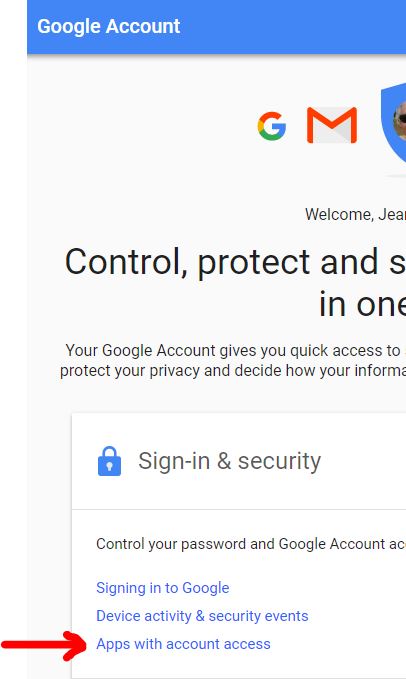
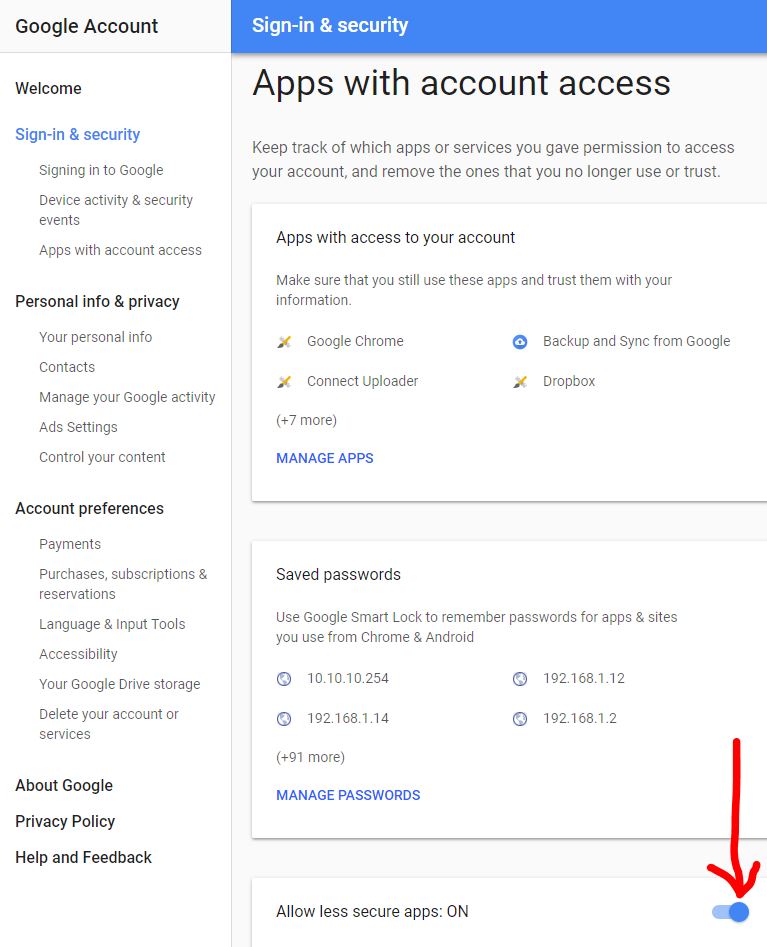
- Setup Smtp Gmail
-
1)To move EasyForYou to a new computer (Top)
1) On the old computer, go to menu Tools->Update software
2) Download and install the trial version of EasyForYou on the new PC. Then encode and print a fictitious invoice (if required click button CD-KEY to receive your activation number).
3) Restart the new PC, but not to start the trial version!
4) Delete the temporary files from your navigator. (very important)
5) Copy all the files from the folder EasyForYou (in general in c:\Users\USERNAME\AppData\Roaming\EasyNet\Easy For You (To locate the folder, see the menu Help->Folder)) of the old PC and paste and replace on the new PC in the folder EasyForYou (in general in c:\Users\USERNAME\AppData\Roaming\EasyNet\Easy For You (To locate the folder, see the menu Help->Folder))
!!! never install EasyForYou in the "C:\Program Files (x86)" folder or in "C:\Program Files"
(These folders are too restrictive and some features of EasyForYou are blocked)
6) On the new PC, please update EasyForYou again (Utilities menu->Update)
!!! -> Windows 10,8,7, Vista, XP
- 2) To add or modify the products quantities in your inventory (Top)
(Necessary modules: EFYSTOCK)
To add or modify the products quantities in your inventory, To modify the products quantities in your inventory, create a supplier Invoice or inventory document:
1) Click the button "Purchase" in the toolbar.
2) Click the tab "Purchase" or "Inventory".
3) Top left, type "REG" like supplier (REG = supplier Code for the inventory).
4) Click the button "+" in the toolbar to add a new document.
5) If the product exist already, in the body of the document, simply select the product with the search button and update the quantity to be returned in stock (Use negative quantities to reduce the stock).
6) If the product does not exist, type the new Code in the body of the document, then type "Enter" and allow to "add the new record". In the document input the quantity to be entered in stock.
Note 1: Outgoing stock automatically accounted for by either the sales invoices, receipt, picking ticket or cash-register. Note 2: Inventory and products valuation can be accessed from the menu List->Products (check inventory) then press button "OK".
- 3) To create a backup (Top)
(Backup on Dropbox,OneDrive or Google drive -> FAQ 39)
Preferably DO NOT use the C:\Temp folder for backups (see menu File->Users).
All the data from your software are in the file c:\Users\USERNAME\AppData\Roaming\EasyNet\Easy For You (To locate the folder, see the menu Help->Folder)\easywin.mdb
To create a backup
"Easyforyou" automatically generates a daily backup in the specified folder in File>Users->Folder for your backup.
By default, the software generates your backup in the folder C:\Temp, but it is preferable to choose a shared folder on another computer as your destination folder.
The backup cycle is one week under the format easywin_X.mdb, X being the day of the week (1=Saturday). A backup is generated as well in the same place when updates of the version of your software Are executed in a file of this kind easywin_5update121719.mdb for the data and a file of this kind for the software: easywin030881142100.exe.
It is suggested that you make a copy on CDROM of the complete folder where you installed your “Easy For You” software from time to time.
To make a free backup on a remote server (in the clouds), you can use https://drive.google.com (15 Gb of free space).
Then in Easyforyou in the menu File->Users->Folder for your backup, you give the path of your local GoogleDrive (eg C:\googleDrive\Easyforyou).
This is the best way to make a backup.
Restoring a backup
If you would like to restore a backup, rename the file (generally in c:\Users\USERNAME\AppData\Roaming\EasyNet\Easy For You (To locate the folder, see the menu Help->Folder)) easywin.mbd to easywinOLD.mbd
Then recopy the most recent backup in C:\Temp\easywin_X.mdb (X= # from 1 to 7 for the day of the week) into the program file (usually c:\Users\USERNAME\AppData\Roaming\EasyNet\Easy For You (To locate the folder, see the menu Help->Folder)) and rename it easywin.mdb
If the restored backup is not the same level as your latest version of the software, go to the downloading page of our Website and generate an update of the software.
If in doubt or in the event of a problem, take out a maintenance contract (see EFYHELPDESK) and contact our maintenance service or Online help. EFYHELPDESK
!!! -> Windows 8, 7, Vista
- 4)Is it possible to correct or erase a document that is closed? (Top)
(Necessary modules: EFYSTOCK,EFYPAIMENT)
In case of an error in a document, for example, to unlock a closed Invoice, you have three possibilities: (The 2nd and 3rd possibilities are not directly available in the free version or in the the trial version)
In File->Document, choose the document in question by clicking on the Code number, then:
1) Click the menu Edit->Reopen Document (Note: after this operation, if you delete the Invoice, the products will be added back to your stock)
2) Click onto the menu Tools->Archive, archive the document in question. If you would like to reuse the document number, archive one document at a time and click onto YES to the question :Automatically recuperate the document number? (Note: This operation will erase the document and the products will NOT be added back into your stock) (See price list->module: EYFARC) NOTE: This operation is irreversible!
3) Edit and correct directly in the EasyWin.MDB database with the Program Access (See Price List->module: EFYMDBACCESS)
- 5)How do you begin an Invoice with #X?
I have saved and sent out invoices and I would like to start with an Invoice number that follows in sequence with the last Invoice. (Top)
(Necessary modules: EFYDATA)
Easy For You bases itself on your PC's internal clock to generate the first document of the new year.
For example, December 31st, 2014, your last invoice is FT120140003453. On January 1st, 2015, Easy For You will generate the invoice FT120150000001.
(Necessary module:EFYDATA)
After generating the first invoice, if you find that the new number is not convenient, you may change it with a right click on the document number
If you would like to create invoices from the preceding year during the new year, you can insert these documents and right click on the document number to change the year and number. See also: Tools Menu> Insert document-> Delete all the lines
- 6)In terms of the functionality's currently present, which ones will disappear within a month (depending on the frequency of use)? (Top)
All options listed in the Price List menu of our site.
The following functions will stay active for free after 30 days demo:
-Client and supplier management
-The possibility to generate and print invoices, NC, Orders, etc…
- Totals listing, tax calculation, profit margins, weight etc…
- 7)If a salesperson receives a commission on products sold, can the commission be calculated?
(Top)
(Necessary modules: EFYLIST)
In the lists, it is possible to track the documents or particular sales of a salesperson:
Proceed as follows:
- In the File->Customer, in the record, on the right-hand side, you can enter a “salesperson code,” for example a letter: D
- Next, in File->Document, in the Tools menu, preceding the "Sales" button, use the same code (D) as in the field “Salesperson Code” and you will obtain a list of documents or sales for Salesperson D.
- 8)Create your setup CD-ROM (Top)
Download easyforyou.exe and copy it to a CD-ROM
- 9)How do you install the software in a network ? (Top)
(Necessary modules: EFYNET2, 5...)
The installation of the software in network can be done via the classical method of simple sharing of a folder for several users (also possible on a Nas)
In this case, see here, below, point 1)
BUT! If you have Windows 10 (or higher) and some computer skills, we strongly recommend that you use the multi-session remote desktop method (without interrupting existing sessions).
It is with this system that you will get the best performance for working simultaneously with multiple people from multiple locations in EasyforYou.
And this is also how you will have the best level of security because you will not have any data that passes on the Internet and your database remains on your main computer.
Make a BACKUP and see the video and patch below for setting Windows in multi-session mode (this procedure is not our responsibility).
Following the installation of Windows multi-session video ...
How to install EasyForYou for the other user(s)
(Assuming your software is already installed in your main session, for example with the user "ADMIN" on your desktop computer)
a) In the Windows session of your main computer (that of your office), connected with the main user "ADMIN", add a new (or several) user with password (for example "Shop1, Shop2, etc ..." )
b) Give read and write permissions for new users "Shop1, 2, 3 ... etc) at the parent folder (EasyNet) where EasyWin.exe is located.
(Usually EasyForYou is in this default folder: C:\Users\ADMIN\AppData\Roaming\EasyNet\Easy For You) (see the exact path in the properties of your EasyForYou shortcuts)
c) On another PC, connect to the main office (desktop) remotely as a "Shop1" user, then download and install a demo version of EasyForYou in the "Shop1" session.
d) Always, on the other PC, following the installation of the demo, simply change the shortcut on the desktop:
Change the path of the shortcut :
C:\Users\Shop1\AppData\Roaming\EasyNet\Easy For You
And replace with:
C:\Users\ADMIN\AppData\Roaming\EasyNet\Easy For You
(ADMIN or the main user name of the desktop computer)
e) As soon as EasyForYou works and you are sure to see your invoices, sales orders and data of the pc of your main office, for security, delete the whole folder: C:\Users\Shop1\AppData\Roaming\EasyNet\Easy For You
f) Repeat as many times as necessary for Shop2, Shop3 etc ...
Windows Multi-sessions procedure : Video Youtube)
Windows Multi-sessions Patch : Patch)
1) On the Server:
-Install the software “Easy For You”
-Share the folder “C:\program files\EasyNET” or " c:\Users\USERNAME\AppData\Roaming\EasyNet\Easy For You (To locate the folder, see the menu Help->Folder) " on the level EasyNet, authorise the Reading AND writing for the folder.
Attention, different procedure for the users from the E-commerce!
Sharing the folder at level … /Eshop/Users for reading and writing for the users of the other PC.
2) On the workstation:
- Install the software "Easy For You" and at first start, fill in the company information. (in order to install the dll, ocx, and so on...)
- Then completely DELETE the folder "c:\Users\USERNAME\AppData\Roaming\EasyNet\Easy For You (To locate the folder, see the menu Help->Folder)" and the shortcut from the desktop too.
In Windows->My Computer->Network, scroll to your server \\My Server\EasyNet - Map a network drive (Y: for example) to the server in folder \\My server\EasyNet with Windows->Explorer>Tools.
- For users of e-commerce, map the folder \\users
- For the users who have the module EFYMDBACCESS at first start, rename the extention from the file (if exist) Y:\Easy For You\EFYMDBACCESS.cok in .cod - Search the program Y:\Easy For You\EasyWin.exe and click right to create a shortcut on the desktop of your workstation.
- For optimal use, synchronize the clocks for all your PCs on the network (date and time)
Notice 1: The demo version is designed to test the software with a maximum of 2 users.
Notice 2: For optimal use online, see the parameters in the menu File->Users->Files.
Notice 3: Important! To optimize network speed, network settings of your network adapter needs to be set to FULL DUPLEX
Notice 4: In order to not have problems of writing rights in the register and in the different folders, it is preferable to give the administrator rights for all the EXE file.
The good Shortcut :
The shortcut on the desktop from the workstation to easywin.exe on the server with a mapping to a permanently network drive (sharing on the level EasyNet) must be like this :
Z:\Easy For You\easywin.exe
NOT like this
\\.....\EasyNet\Easy For You/easwin.exe
For Dell computers to improve the performance of your software into a network:
Go to Dell computers download page
- 10)Use of the printing modules of transport files (Top)
(Necessary modules: EFYEXPRESS)
1) Verify that you have the license EFYEXPRESS->File->Licenses
2) Add the transporters in the customer management, adjust the Type in “Express Mail”. (For example UPS)
3) Copy the files layoutEFYEXPRESS.htm and layoutEFYEXPRESSsmall.htm in the same folder as easywin.exe
4) Rename the files layoutEFYEXPRESS.htm and layoutEFYEXPRESSsmall.htm to layoutRefcustomer.htm and layoutRefcustomersmall.htm (For example: layoutUPS.htm and layoutUPSsmall.htm)
5) Enter the printer names in EFY->Tools->Parameters->General:
Printer 1*: For general EFY documents
Printer 2*: For large transporters files
Printer3*: For small transporters files
*Use the exact name in Windows->Start->Parameters->Printers
6) To print the files, click the right button on the printer icon in document management, and then choose the transporters. You can choose to print a number of transport files equal to the number of products of the active document by default.
7) Adapt the layout by modifying the HTML code with the help of an editing style Front-Page or Dreamweaver in the files layoutsRefcustomer.htm by the printers’ brand-name with the help of an HTML editor, or by contacting our company to adjust the page setting.
8) Fill in the values and fixed text if necessary in layoutRefcustomer.htm the same as with an HTML editor.
- 11)Printing pictures that illustrate the products on the documents (Top)
(Necessary modules: EFYIMGDOC,EFYDATA)
1) Verify whether you have the necessary license EFYIMGDOC->EFY->File->Licenses
2) Verify whether you have the necessary license EFYDATA->EFY->File->Licenses
3) To link an image to your products, copy your image file into the folder c:\Users\USERNAME\AppData\Roaming\EasyNet\Easy For You (To locate the folder, see the menu Help->Folder)\Images and rename the PRODUCT_Code.JPG (or GIF)
4) Activate the marked box “Print images on documents” in product management under the Image tab
5) Activate the marked box “Print images on documents” in the journal management
6) Adjust the size of the images in the menu Tools->Parameters->Products->Reduction for image printing
Warning: Send emails including photos only works with: Email PDF
See alson FAQ 41
- 12)DECREASING PRICE SCALE for automatic calculation of product sales prices
(Top)
(Necessary modules: EFYCATEGORY,EFYPRICEPQ)
*Specification of decreasing price scale by quantities:
Create a Category in Category Management
Select your category in product management under the WEB tab (bottom right)
Mark the box “decreasing price scale” under the WEB tab
(In the price encoding area of the products file)
Fill in the 5 decreasing price scales by using the 1st price as the highest one.
Fill in the 4 “By quantity” fields, (in the price encoding area on the right).
For a value, give a QUANTITY of products from which the price should decrease from price 1 to price 2 and so forth
*Specifications of the decreasing price scale in terms of the CATEGORY! (NOTE: priority of quantity over price):
In the management of categories, create a category, choose the type “Price”, and add a price for a quantity of products from … to…
Add as many brackets of prices or margins (choose the “Type” price or profit margin in comparison to price 1) for quantities of…to… as you like.
In products management, select your category under the WEB tab (bottom right).
Note: The type “Category Margin” or “Category Discount” allow you to calculate the profit margin or discount on price 1 of the products depending on the customer category.
For example:
In customer management for customer ACBTEST in the category zone (bottom right) enter a category code of your choice; for example X.
In the management of categories, create a new category, for example CARS and choose the type “Category discount”, fill in the description and save. Click the + button to add a category of customers for this category of products “CARS”.
In the category, type X (your customer category) and 30 for the discount.
In product management, create a new product, for example “CHEVROLET” and in the file WEB, fill in its category with “CAR”.
From now on, in document management, when you make an offer or invoice for the product “CHEVROLET” for Mr ABCTEST, he belongs to the customer category X who have the right to a 30% discount, therefore the calculated sales price is price 1 in the products file, less the 30% discount.
- 13)Product management by serial numbers (Top)
(Necessary modules: EFYSERIAL,EFYADVSEARCH)
Encoding serial numbers:
Serial numbers may be encoded in sales or purchases.
To encode a product serial number, click on the body of the document to enter the edit mode in the document management (purchases and/or sales), then point the cursor of the mouse on the product Code, then click the right button.
In the popup menu, choose “serial number” to open the serial number encoding window.
These serial numbers can be encoded with the help of a bar code scanner that interfaces with the keyboard (parameterise a CR-LF for automatic entry) or manually.
When encoding manually, the second field allows for the entry of a “series” of serial numbers that follow each other.
Document search (sale or purchase) by serial number:
To conduct a search via a serial number, type manually (or with the help of a bar code scanner) the serial number you wish to find in the document management in the search field “customers-suppliers” at the top left WITHOUT hitting the enter or tab key. Click on the RIGHT on the search button (binoculars) of the field. A popup menu will appear. Choose “serial number3
If a document with this serial number exists, it will automatically appear and a popup will indicate the product Code for the serial number.
Automatic encoding via serial numbers (ONLY FOR SALES):
In the documents grid, double-click on the existing document number in which you would like to directly add products via their serial numbers (for this to function, the serial number sought must have already been entered in one of the “PURCHASE” documents.)
In the “Serial Number” field (to be found in the toolbar, second field on the right of the “send by e-mail” button) enter or scan the serial number. If this serial number exists in the purchases, the product Code will be found and a line will automatically be added at the end of the current document (the serial number is also saved for this sale and may thereafter be found via a search (see above)
IMPORTANT: when you copy a document towards another document, the serial numbers automatically follow onto the new document.
For coding serial numbers, you can choose which field the cursor should stop.
Add a line with the variable in ALL.INI file:
SerialEnterIndex = 0
Possible values:
0 = After ENTER, move the cursor to the input of the next serial number.
1 = The cursor moves to the next serial number after press ENTER after the "Number" field.
2 = The cursor moves to the next serial number after press ENTER after the "Packed" field.
3 = The cursor moves to the next serial number after press ENTER after the "Expiration" field.
- 14)Encoding hourly fees (Top)
(Necessary modules: EFYDATA)
To encode hourly fees:
In product management, create a product for the invoicing of fees:
Example:
Code: FEES
Description: hourly fees
When encoding the description in the body of the document, use the following syntax:
FEES hourly fees 14h45->18h30 + eventual description
It is important to follow this hourly format: 14h45->18h30, always 2 numbers followed by a letter then followed by 2 numbers the minus sign and the greater sign, then once again 2 numbers followed by a letter followed by 2 numbers
XXhXX->XXhXX
In this case, when the description is validated, the software will calculate the time elapsed between the two times given:
Example: 14h45->18h30 = 3 hours 45 minutes which calculates automatically 3, 75 units
- 15)Export and import the products file (MDB) (Top)
(Necessary modules: EFYPRODIMPEXP)
Export the products in a database:
In EasyForYou, go to menu Tools->Export products.
EasyForYou will generates a file with MsAccess format (C:\Temp\ArtEFY.mdb) which contains the whole of the products present in EasyForYou.Importation of a new database:
After having exported C:\Temp\ArtEFY.mdb, take this database as structure sample.
You can modify the price of the products present in ArtEFY.mdb, it will be updated in EasyForYou during the re-importing.
To add new products in EasyForYou, respect the structure of ArtEFY.mdb. Carry out a copy of ArtEFY.mdb in then folder c:\program files \easy for you while taking care to rename the file to import as ART.MDB.
During the restarting of "Easy For You" the new products will be imported and the price of the existing products will be updated.
Caution: following this operation, file ART.MDB will be automatically deleted.
Please respect these recommendations for the import of new products:
- In the field CLEF (product Code) , only numbers, capital letters allowed.
- No spaces allowed in this field!
- Only the sign "-" (less) is accepted in the field CLEF and CLE2.
- In the fields texts, do not use apostrophes or star (*) .
- For the quantities, not to update field QUAN (quantities) directly but to pass by the encoding of the purchases - > Inventory.
- 16)Classification of the documents to the passage of the new year (Top)
Easy For You bases itself on your PC's internal clock to generate the first document of the new year.
For example, December 31st, 2014, your last invoice is FT120140003453. On January 1st, 2015, Easy For You will generate the invoice FT120150000001.
(Necessary module:EFYDATA)
After generating the first invoice, if you find that the new number is not convenient, you may change it with a right click on the document number
If you would like to create invoices from the preceding year during the new year, you can insert these documents and right click on the document number to change the year and number. See also: Tools Menu> Insert document-> Delete all the lines
- 17)Back-Order management (Top)
(Necessary modules: EFYBACKORDER)
The Back-Order tab lists the OPEN orders of all customers (or suppliers for purchases)
BO=Back-Orders (orders that have not been delivered yet)
TO CREATE A PARTIAL DELIVERY :
- Under the back-order tab, select the specified customer by double-clicking the corresponding line of the document.
- For each product, enter the quantity to be delivered under the column "delivered" (the only column you can edit) and press the F10 key to validate the whole operation
- To generate the invoice corresponding to these products and to remove them from the inventory: click Code customer and then click the right button of your mouse and choose "copy to" invoice or picking ticket
- Only the lines corresponding to a fill in delivery disappear from the table after invoicing.
- The corresponding order is automatically closed when the total of the products have been delivered.
- Printing or the pre-visualisation shows the quantity left to deliver
- 18)Procedure to modify the file layoutmod.htm (Top)
(Necessary modules: EFYLAYOUT)
1) Keep a copy of your file layout.htm and make a copy to a new file: layoutmod.htm
2) Modify your file layoutmod.htm with a HTML editor
3) You may NOT at any time:- Delete the field us-Name1, us-post and us-City that must be represented in the heading of your new document.
- Delete the tag of commentary that serve as a point of Code for the software
4) Test your new page layout by printing several different documents.
NOTE, as long as you do not have the official EFYLAYOUT licence at your disposal, the amounts will be replaced by the word "TEST" or 0 and the software will post a message such as "Licence EFYLAYOUT for c:\...\layoutmod.htm is invalid"
5) If you are satisfied with your new page layout, please send us your file layoutmod.htm by attachment for approval.
6) Once you have received an approval, you may order and pay for the module EFYLAYOUT.
7) As soon as your payment has been received, you will receive the official licence in an attachment via email.
- 19)Parameterisation and using your barcode scanner. (Top)
(Necessary modules: EFYBARCODE)
1) Parameterisation of EasyForYou.
In the menu Parameters->General->ID Barcode->Value = 120
2) Parameterisation of barcode scanner (keyboard interface).
- Language for keyboard interface (group 3)
Adjust the country parameters for your keyboard - Terminator: (group 4)
No character (ENTER) after scanning but SPACE. - General Parameters (group 16)
Choose: Upper Case
- Code ID Setting (group 17)
Choose the barcode types (the most used: CODE39, EAN13/UPC-A) - Function Key Emulation (group 20)
Program the beginning of the scanning (see group 6 - Preamble) of the barcode by the function key F9 or HEX 09
3) Scan the barcodes from EasyForYou.
In document management, choose your customer or supplier, then the type of document followed by the + button or F2 to add a new document. From this moment, the focus automatically passes into the bottom grid to the encoding of products and you may begin the data entry of your barcodes with your scanner.
If the barcode Code of the scanned product does not already exist in your product file, EasyForYou prompts you to create a new product form.
Softwares
LSN4 USB Setup
(Read instructions here User Manual LSN4).
CPT8000 or CPT8001 CYPHERLAB (LSCPT8001) USB Setup
(Download instructions here https://www.easy-for-you.com/download/cpt8000.zip).
(Download TOOLS here https://www.easy-for-you.com/download/cpt8001/tools.zip).
BCST-20 and 10 (LSIDABAR115) USB Setup
First time, do NOT connect with the cable (use only to charge the scanner) !
Plug only the USB Dongle Bluetooth and allow the driver to install.
(Download and print the Barcode scanner Overview instructions here https://www.easy-for-you.com/download/BCST-20/BCST-20.pdf).
The only thing you need to do is to select the type of keyboard :
#8 Keyboard Language Setting
Read "Start Setting’ Barcode" - "Select your keyboard language" - "Save and quit"
(If not done, change your PC language as selected)
To do only if you want to group the quantities in the same line of a same product when scanning
(Download and print the INSTRUCTION MANUAL setup instructions here https://www.easy-for-you.com/download/BCST-20/BCST-20-advanced.pdf).
1) Page 46, scan "Enter setup" and Scan "Do not apply Enter for suffix" and scan "Exit with Save"
2) Page 48, scan "Enter setup" and Scan "Suffix Setting" and scan "3" and scan "2" and page 49 scan "Exit with Save"
(To Activate, check the variable in EasyForYou, menu tools->Parameters->Miscellaneous 2->ALL->Boolean->GroupQuanWhenScan)
UNITECH HT580 (LSHT580) USB Setup
(Download full instructions here https://www.easy-for-you.com/download/HT580/HT580-readme.pdf).
1- Create a folder c:\temp\DriverHT580
2- Download the driver from the site and unzip to a tempory folder c:\temp\DriverHT580 (DO NOT INSTALL THE DRIVER)
3- Connect the scanner before and when windows detect the new hardware, give the driver location map c:\temp\DriverHT580 to found the driver
Or download the PDF with the full procedure to install the drivers :
(EN) https://www.easy-for-you.com/download/HT580/FirstUse_EN.pdf
DRIVERS:
Unitec HT580 Website
or
Windows VISTA+W7 or 8 Driver
Windows XP Driver
Download Tools.zip Utility.
Open the Tools.zip, navigate to the folder Tools.zip\Tools\12Comm\*.* and copy all the 3 files to c:\....\Easy For You\import
Delete the two files WorkingINI.txt AND README Vxxxx.TXT
Start 12com.exe and wait a few seconds and STOP 12com.exe
The 12com.exe have created a new file 12Comm.ini
Edit the file 12Comm.ini with the Windows notepad and set :
COMPort settings = X,38400,8,1,0 (X= the com port from the UNITECH scanner available in Windows->System->Hardware->Peripherals->Ports COM...)
File(s) on PC = HT580.TXT
Save the file 12com.ini
Start again 12com.exe and scan a few barcodes, on the scanner, select tranfer to the computer, start EasyForYou and Press Shift-F2 keys
With Windows XP or if 12comm.exe give you a error message, go to Microsoft web site https://www.microsoft.com/downloads search and install .NET Framework
Other scanners :
BTS 4500 & BT-650 (LSIDABAR115) Default Setup for BTS software ( to UNZIP and copy in c:\....\easy for you and to load in BT scanner software, start the scanner software and load this file and push the button Upload file)
OPTICON (obsolete) (LSIAOPT-OPN) USB Setup (to run before connecting the scanner)
OPTICON Utility ( to copy in c:\....\easy for you\import )
EN: How to obtain a EAN13 code for your business -> https://www.gs1belu.org
FR: Obtenir un préfixe d'entreprise GS1
NL: Vraag een GS1 bedrijfsprefix aan
- Language for keyboard interface (group 3)
- 20)Several precautions to update successfully when using EasyForYou (on the network) (Top)
(Necessary modules: EFYUPDATE)
Before update, please STOP first all other sessions from the Application Easy For You in the Windows Task Manager.
Procedure (single user)- If possible, make a backup in the menu Tools-> Backup ...
- Shut down your computer and restart it and above all: do NOT start EasyForYou !
- Download and run the update by clicking the button UPDATE
- Wait until the update if finish and re-start EasyForYou.
- Check the licenses, click File-> Licenses-> To download...GO ...
- In the Menu Tools->Update software, check if the date of license is OK-> 20??, Otherwise click the menu Tools-> Calculation of the price of your update order the license.
In network you must insure at 100% that:
- Verify on each workstation that no easywin.exe session is open (see Windows->CTRL-ALT-DEL->Task manager->Applications).
- Execute a test (on the server if you are on the network) by renaming easywin.exe and easywin.mdb to easywin2.exe and easywin2.mdb.
- If Windows authorizes the name change of both files, you can be sure that no one is working in the EasyForYou program.
- In the properties of the shared folder for the network, please DO NOT SHARE THIS FOLDER until the update takes place normally.
- (On the server, if you are working on the network) rename easywin2.exe and easywin2.mdb with their original names easywin.exe and easywin.mdb.
- DO NOT restart EasyForYou and update from the site on the downloading page ("update" button at the bottom of the page)
- In the properties of the shared folder for the network, re-authorize the sharing of the folder.
Wait for EasyForYou to restart.
You can download the last version from here.
https://www.easyforyou.be/updatefromeasy.htm
* 5 steps for NAS server mapped drive update OR in case the update is not successful on your computer with the other procedures :
1) Check if Make sure you have the latest update:
(see in the title bar of your EasyForYou software): Vers. YY.MM.xxx
Or in case YY and MM are the current year and month, you probably don't need to do an update (unless there is a bug)
Otherwise, proceed with the update as follows:
2) Launch EasyForYou and create a backup from the Utilities menu.
3) Check where the EasyForYou program is located, In EasyForYou, click the Help menu->Folders->EasyForYou
*** !!! Remember the name of this folder !!! for next step
4) Stop EasyForYou on all computers! And shut down all computers where you use EasyForYou.
Restart only ONE computer where EasyForYou is installed.
Warning!!! DO NOT restart Easyforyou on this computer after the computer has restarted!
5) Download the update from this link :
https://baron.be/download/allexe.zip
unzip the file and copy all extracted files to the EasyForYou folder ***.
Replace existing files.
If you have a multi-user system, you should only update one of the workstations.
Restart Easyforyou and check if the version number is correct.
(In case of multi-user network version, If you restart EasyForYou, on all other computers, the version number must have been adapted)
* If you have problems after printing PDF to reset your original
windows default printer as default printer :
Open your registry with regedit
Go to this registry key
HKEY_CURRENT_USER\Software\VB and VBA Program Settings\EFY\Settings
Add a new string value :
DefaultPrinter
And copy paste the name of your default printer as value
* If you have problems to print some list or list previeuw :
Try to run the software easywin.exe as Administrator (right-click)
If work not then :
Make a backup !!!
In the c:\....\EasyNet\Easy For You\all.ini , edit with notepad and set the line Transactions=N (or add this line if not present)
DONT FORGET THIS STEP ! : Rename the folder c:\....\EasyNet\Easy For You AS c:\....\EasyNet\Easy For You-OK
Stop and restart your computer, but before you stop disable your antivirus for a few minuts.
Download and reinstall the demoversion from us website.
(this will reinstall all the needed windows components for Easyforyou)
Rename the folder c:\....\EasyNet\Easy For You as c:\....\EasyNet\Easy For You-DEMO
Rename the folder c:\....\EasyNet\Easy For You-OK as c:\....\EasyNet\Easy For You
To Make a test of your list start c:\....\EasyNet\Easy For You\easywin.exe
If this work not try to change the compatibility for c:\....\EasyNet\Easy For You\easywin.exe
If this work not try to change users and set to admin for c:\....\EasyNet\Easy For You\easywin.exe
- 21)Procedure to uninstall completely EasyForYou (Top)
- Uninstalling EasyForYou in the classical manner :
Windows->Start button->Parameters->Settings->Add/Delete program->Easy For You->Delete.
- fill inly delete the folder EasyForYou in c:\Users\USERNAME\AppData\Roaming\EasyNet\Easy For You (To locate the folder, see the menu Help->Folder).
- Uninstalling EasyForYou in the classical manner :
- 22)Setup E-Commerce
(Top)
(Necessary modules: EFYESHOP)
Setup E-Commerce
- 23)Generate the Invoice Reminders (Top)
(Necessary modules: EFYREMINDER)
Parameterize
See Menu->Tools->Parameters->Accounting.
Advanced management can be activated if you click the checkbox "Activate the advanced invoice reminder system”
Three templates of reminders are available.
They are intended automatically to generate remind letters via the
Menu Tools->Generate the invoice reminder’s
OR via
Menu File->Users->Activate the automatic invoice reminder system.
Reminders are generated, with the first starting and this once per day. The genarator print the remind letters to be sent for the unpaid invoices.
The remind letters of level 1 is generated automatically under the following conditions (according to the language of the customer):
1) the invoice is not paid (the type of payment is always on "To be Paid")
2) In the management of the customers, the category of invoice reminder is NOT on "No Invoice Reminder"
3) the due date of the invoice + the number of days indicated in the field "Level 1" (15 days by default) is exceeded.
The remind letters of level 2 is generated automatically under the following conditions:
1) Same as level 1
2) Same as level 1
3) the date of the first reminder (visible on the bottom of File->document) + the number of days indicated in the field "Level 2" (15 days by default) is exceeded.
The remind letters of level 3 (formal warnings) is generated according to the same principle as the remind letters of level 2 by holding account of the level 3.
Modification of the models of letters.
In the grid of buttons (3 levels and 6 languages) for editing the remind letters, it is possible to edit the HTML templates while clicking on the corresponding button.
Please check beforehand if A text HTML text editor is parameterized by default in your Internet Explorer in your menu Tools->Internet Otions->Programs (By default, Front-Page)
If layoutRxLL.htm (x=reminder level, LL=Language of the reminder) is not present in then folder of EasyForYou, please download the files on https://www.easy-for-you.com/download/layoutRxLL.ZIP
By Checking the boxes "From level", you can parameterize dunning charges Or interest rate which will be calculated starting from the due date and will be added in the reminders.
The default category of invoice reminder will be taken again automatically when adding of a new customer in EasyForYou.
Various functionalities related to the use of the reminders:
Since the management of the documents (only available in the invoices tab): Click the "Not Paid" button, then click the right button of the mouse to filter and to show only the invoices having a reminder of level X or to post only the generated reminders this day.
A right click on the number of a document show the contextual menu, choose "Invoice reminder" and the level wished to pass the invoice.
A right click on the printer button for printing a reminder letter (Same for the email and preview buttons).
- 24)Password for accessing the database (easywin.mdb) (Top)
(Necessary modules: EFYMDBACCESS,EFYHELPDESK)
CAUTION: Never open the database Easywin.mdb directly MSACCESS
Record your licence EFYMDBACCESS and check the presence of the file Accesstomdb.txt
If you do not have a network version of EasyForYou (EFYNET...), the database will be open exclusively, consequently to carry out the following operations STOP EasyForYou.
In the folder of the database easywin.mdb (in theory c:\Users\USERNAME\AppData\Roaming\EasyNet\Easy For You (To locate the folder, see the menu Help->Folder)), to create a new blanc database with Ms Access which you name EasyWin_the_name_of_your_company.MDB.
In the new database, click the "New" button and choose "link”, then select c:\program files\easyforyou\easywin.mdb finally click on the button "Link" to attach the tables.
Enter your password which is in Accesstomdb.txt.
Choose and select the tables, so your database is ready.
In this way, at the time of the updates of EasyForYou your personal MsAccess database will not be affected.
- 25)Instructions for sending your file easywin.mdb (Top)
1) Be sure to have a compression software (for example :
https://www.winzip.com
https://www.rarlab.com
(the free version is enough)
2) In Windows, click the RIGHT button of your mouse on the "Start" button, a contextual menu will appear.
3) In this contextual menu, click on “Explorer"
4) In the left part of the Explorer, click on “Work-Station" - >Disk (C:)- > click the folder c:\Users\USERNAME\AppData\Roaming\EasyNet\Easy For You (To locate the folder, see the menu Help->Folder) as in the picture.

5) In the right window, click the RIGHT mouse button on the file easywin.mdb (*)
- (*) If you do not see the extensions in your exploreer, click on menu Vieuw->Details.
- (*) If you still do not see the extensions, in your Explorer click the Tools menu->Folder Options->Vieuw->files and folders and UNcheck “Hide file extentions for known file types”, then click the “Apply" button
6) Right-Click on easywin.mdb, and in the contextual menu, choose “Compress and E-mail”.
- 26)Instructions to receive your file easywin.mdb
(Top)
1) Be sure to have a compression software (for example :
https://www.winzip.com
https://www.rarlab.com
(the free version is enough)
2) In Windows, click the RIGHT button of your mouse on the "Start" button, a contextual menu will appear.
3) In this contextual menu, click on “Explorer"
4) In the left part of the Explorer, click on “Work-Station" - >Disk (C:)- > click the folder c:\Users\USERNAME\AppData\Roaming\EasyNet\Easy For You (To locate the folder, see the menu Help->Folder) as in the picture.
5) In the right window, click the RIGHT mouse button on the file easywin.mdb (*)
- (*) If you do not see the extensions in your exploreer, click on menu Vieuw->Details.
- (*) If you still do not see the extensions, in your Explorer click the Tools menu->Folder Options->Vieuw->files and folders and UNcheck “Hide file extentions for known file types”, then click the “Apply" button
6) Right-Click on easywin.mdb, and choose contextal menu "Rename" and rename the file towards easywin-old.mdb (if easywin-old.mdb already exists, please beforehand erase it).
7) In your E-Mail software, double click on the received attachment (the file easywin.zip).
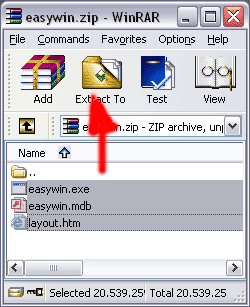
8) When Winzip is Open, select ALL the files contained in the ZIP.
9) In WinZip, click the button “Exctract To” and to choose the usual folder of your “Easyforyou” software (in general c:\Users\USERNAME\AppData\Roaming\EasyNet\Easy For You (To locate the folder, see the menu Help->Folder)).
10) Unzip and overwrite the existing files by ALL those contained in ZIP file.
- 27)Possible parameter settings by INI Files (Top)
INI Files are simple text files and can be created with the notepad of Windows and be saved in the file where is installed your software (in general c:\Users\USERNAME\AppData\Roaming\EasyNet\Easy For You (To locate the folder, see the menu Help->Folder))
These files are intended to activate certain specific parameter settings.
The name of a file INI is consisted of the Code of the left 3 caracters of the document number (Type of document) for which it must act.
For example: for the invoices it will be FT1.INI
The contents of file INI must end in word END
Click here to download an example of INI file (or use ALL.INI if the parameter must be able for all the documents)
Available variables and their function:
NumberLineBody=0 (number of lines in the body of the document)
NumberLineFeed=0 (number of lines in the foot of the document)
NotPrintToPay=Y (does not print the mention `to pay' on the document)
Jo-Message-EN=Message… (Long Message for the foot of the documents. These messages must be written in only one line but can contain HTML tags, for example to pass the text to the line. The comma must be replaced by
  and
and  for the Semicolon and
  for the apostrophe)
Discount-Message-EN=Message... in the event of use of discount - product ESC (same for NL. .EN. .IT. .DE...ES…PT…)
DontUpdateCreditWhenImport=Y (does not affect the balance of the customer in the event of importation of invoices by the system of importation of text files)
SequenceToOpenCashRegister=65 (Character for control sequence of opening of the cash register)
PrintPriceWeight=Y (Print the price by kilo on the documents)
OnlyCreateTableOnPrintLabels=Y (Creates a table LAB001 in easywin.mdb containing the data for the impression of bar-codes labels during the impression of a document)
PaymentRefNumber=999 (Code in the event of insertion link for payment by credit card)
CopyDocumentIn=copydoc (name of the folder (directory) in which you wish to preserve a copy of the original printed documents - HTML)
PrintPaidOnFeedDocument=FF0000 (impression in red of the text `Paid' on the paid invoices.)
LoginPaypal=info@yourloginPaypal.com (login paypal from Link for secure payment by credit card on the document)
PrintTL=Y (Print the number of lines on the foot of the document)
Shift-F7=T (Shift-F7 save the payement type 'T' and print the document)
SecondTaxField=DEPOSIT (replace the management of REPROBEL taxes by a management of the guarantees for the consigned products. Also possible for BEBAT, AUVIBEL)
WaitCoef=0.5 (Multiplying coefficient 2 - or divider 0.5 for the function wait function - ALL.ini)
NoQuestionForSerial=Y (No question if encoding of the number of serials # <> of the quantity - ALL.ini)
PrintCustomerEAN13Barcode=Y (Print the customer code with a EAN13 barcode on the documents)
PrintDocumentEAN13Barcode=Y (Print the Document number with a EAN13 barcode on the documents)
JouPopup=BC1 FT1 (or Y = ALL : name of the document type /POP:..type this code in the customer additionnal field and the Text that must be showed in a popup when you encode a new document
PutUserInRefPayment=Y (Adding automatically the vendor code in the payment reference when encoding the type of payment in a document)
ProductsMarginsfixed=Y (If Yes, in File->Products the recalculation of the 5 sales prices appends in the event of a change in costprice regarding the 5 Margins)
SecondTaxField=DEPOSIT or EXISES (replaces REPROBEL management fees by managing deposits for returnable or excise duties for the sale of alcohol products)
TakeUserLanguageToPrint=Y (When printing a document, the choice of language is based on the user's language)
ShortCut1=%IA (Example = ALT-IA-I. Alt-I for insert, ALT-A for Attachment - For the ALT use the character % (Create a shortcut to attach a document in your e-mails. Create the shortcut with the first letter of the pressed key ( if the ALT key is pressed, use the character percent (%). Consider uppercase and lowercase)
Available in:
- Sending a email with invoice in PDF format as attachment (FAQ 36)
- If you specify a ‘destination type document in case of sending data as attachment’ in the menu File->Documents settings.
END
Additional variables for the *.ini files
Jx-Message-(Customer Language)-(My VARIABLE in additional fields Customer)=My specific text (Put your variable and specific text in FT1.ini for the invoices, in BC1.ini for the orders... example for : Jx-Message-EN-XXX=Blablabla put /BDP:XXX/ in the additional fields Customer
tx-Adre=Y (put the text "Adress" above the name of the customer/suplier when printing a document)
PathForExcelFiles=c:\tmp... (in All.ini select a specific folder for the export off excell files)
Note: If you like to change the c:\temp path, change into the registry from all the CLIENTs computers : HKEY_CURRENT_USER\Software\VB and VBA Program Settings\EFY\Settings\TempPath
ListDocReplaceTELE=ADR2 (in menu List->Documents replace the column "Phone" with another variable from the "CLI001" customer table)
ListDocReplaceMAIL=NOM2 (in menu List->Documents replace the column "E-Mail" with another variable from the "CLI001" customer table)
ReplaceLanguage=NLCN (for all.ini -> replace all the language NL 'dutch' with CN 'chinese' -> in case you put (translate yourself) the chinese text in colum NL from the Access file easytext.mdb)
GetDeliveryAdressIn=BC1*FT1...(for all.ini -> When printing a document, show the promt to select the adress or delivery adress if a delivery adress exist DO NOT use the semicolum as separator, only the *)
AddDeliveryAdressIn=BC1 or FT1...etc NEW(for all.ini -> When create a document, if a delivery adress exist then add automatically this delivery adress in the beginning of the body of your document)
PrintSerialReport=Y In this case, do not print serial numbers on the document (invoice, delivery notes), but print a separate report for all serial numbers regarding the document (invoice).
NoTransactions=Y (Stop the sql transactions process when updating database - no BeginTrans, CommitTrans, RollbackTrans possibility)
NobackupWhenRegroupDoc = Y (Regroup faster but not safe. Do it at your risk)
PrintIntrastat=Y (print intrastat codes from product form in the export documents (use this in BC1.ini, FTA.ini...)
SortByKey=CLE3 (print documents sorted by CODE 3 (use this in ALL.ini OR BC1.ini OR FTA.ini...) - you can also use variable CLE2 for "CODE 2" or Localisation for "Location"
SortBOBy=CLE3 (Sort Back-Order (BO1,BO2) documents on screen by CODE 3 (use this in ALL.ini) - you can also use variable CLE2 for "CODE 2" or Localisation for "Location"
DontPrintCode=Y Do not print the product code on the documents (use this in BC1.ini, FTA.ini...).
GroupQuanWhenScan=Y When you get a products with Barcode scanner in a document, group the quantities for the same products in the same line
DoNotUpdatePackages=Y When you change the purchase prices from a product do not recalculate the packages (increase the speed)
SpecialEscompte=8 When getting the product ESC (discount % if payd before 8 days), do not change the total documents on the food (put the text in the body of document instead of putting the text on the foot)
TextColPrice=Special text When printing a document, in the layout, you can replace the original text "Price" with your specific text - for example replace "Price" with "Unit prices" (use this in BC1.ini, FTA.ini...).
PrintTwoUnitPrices=Y When printing a document, replace the price with Price level1 + customer price (gross prices and net prices) the colum "Price" - (use this in BC1.ini, FTA.ini...).
CheckStop=Y Whit this parameter, the program easywin.exe check the stop.txt file in the network every 2 seconds and stop run all users if stop.txt is present
DocformatNR=2011-12/9999 Whit this parameter, you can format manually a specific document number (write the number (as example "2011-12") you want before the "/", and the 9999 will be replaced with the real document number)
OkLLSales=Y By default, Width and Length work only for purchases in the documents, with this option Width and Length work also for sales
PrintCashOnRegister=Y Print also the cash for each Users on the menu List Payments
DocformatNR=[mm] Add the month into the simplified document number ( 2012-01/1 )
GotoQuan=Y After a product selection in the document, focus go to the field Quantity
PrintPaymentDetails=Y After update the document, the details from all the paiments done are added as text in the body of the document
OkToMatchByAmount=Y (in All.ini for module: EFYCODA) If OkToMatchByAmount=Y and the payment reference does not correspond to any invoice, the software searches for an not paid invoice which corresponds to the amount of the coda. If ONLY ONE unpaid invoice is found and corresponds to this SINGLE amount, it will be cleared
ToleranceMatching=2 (in All.ini for module: EFYCODA) It is better to set ToleranceMatching=1 or 2 (corresponds to a small difference of 2 more or less eurocents). For example an invoice with amount of 1499.15 will not be cleared if the payment corresponds to 1499.1499 (this happens regularly in the coda files) or vice versa, for example an invoice with an amount of 1499.1499 (when printed the invoice is 1499.15 but for the research it will be 1499.1499 and will not be settled if the payment corresponds to 1499.15)
MinimumKiloBytesPDF=200 Check and set the minimum KiloBytes size of your *.pdf documents in the EasyNet/Easy For You/PDFdocuments folder. With this, the PDFPrinter will wait until the end of the print
Translations=
https://www.bing.com/translator/
With this parameter, EasyForYou will activate a button
in your menu Files-> Products to automatically perform a web translation of the product
description in commonly used languagesused languages
Exporting text files containing the data to (re-)generate documents
- Export possible in menu Tools->Regroup Documents or with a RIGTH->Click on the print button, select Export)
- To re-import a generated document, copy the text ctp8****file.txt in the folder Easynet\Easy For You\import and press shift-f2
FolderForCrossFiles=C:\Users\Test\import With this parameter, you can specify a folder for exporting a document in text format (this, for example to send it by email or re-import it into another EasyForYou from another company)
CustomerForCrossFiles=MYCUSTOMER With this parameter, you can specify a specific customer (or supplier) when exporting a document in text format (this, for example to send it by email or re-import it into another EasyForYou from another company)
TypeDocForCrossFiles=INV With this parameter, you can specify a type of the new document generated when exporting a document in text format (this, for example to send it by email or re-import it into another EasyForYou from another company)
DocName-X-FR = Printed name of the document in French in case the vendor code is X
Used to change the name of a document according to the vendor code.
(for example to change "Purchase Order" to "Returned Products")
In the example BC1.INI (BC1 = Order, but it also works for all other documents BC1, FT1 etc ...)
DocName-X-FR = Printed name of the document in French in case the vendor code is X
DocName-X-EN = Printed name of the document in English in case the vendor code is X
Same logic for other languages ... (you can also put another name according to the letters)
DocName-Z-NL = Printed name of the document in Dutch in case the vendor code is Z
SetPaidButton=ON (or OFF) Set Payment button in menu selection from the lists and groupdoc.
SetNotPaidButton=ON (or OFF) Set Payment button in menu selection from the lists and groupdoc.
SetOpenButton=ON (or OFF) Set Payment button in menu selection from the lists and groupdoc.
SetClosedButton=ON (or OFF) Set Payment button in menu selection from the lists and groupdoc.
Parameters when sending documents by email
FileForAttachmentDoc (*filename.pdf for pdf file attachment with terms and conditions)
FileForTextSubjectMail (specific text for the subject)
FileForTextBodyMail (*filename.htm for specific text for the body)
NB: In case of multi-language, you can write FileForTextBodyMail(Language code 2 letters) or FileForTextSubjectMail(Language)
txtServer2=smpt.WithAnotherSMTP.com (Add this only in ALL.ini, If you have more than one SMTP connection - You can use txtServer2,txtServer3,4... until 10)
UrlSoc (Url to your logo file on your website to include in the mails:
for example
UrlSoc=https://www.baron.be/images/logosmall.gif )
ProductsGenerator=Y In Menu Files->Products (Key F8) Automatically generates a series of new products regarding the files Size.txt and Colors.txt
* filemane.pdf or filename.htm can be filenameXX.pdf (XX can be replaced with all of the 7 languages)
ALL.ini file only
Gettext Replace or translate a text in the program : AAA=old- (EN) NOT FOUND text- (EN) NOT FOUND BBB=your- (EN) NOT FOUND translation- (EN) NOT FOUND Add a line in the ALL.ini file with GettextAAA=BBB and save.
Specific for printing labels
specialLogoLabel=MyLabel.jpg (select a special picture to print on your label)
SecondLogoLabelsProductCode=X (if the name of the picture printed on label is MyLabel.jpg, the picture XMyLabel.jpg is selected and printed only if the product code begin with X)
GetSpecialLabelFileName=FTA (Load special label parameters in file easylabel-docFTA.ini when comming from menu List->Print Labels Barcodes)
specialQuantityLabel=4 (set a specific number of colums when printing labels on A4 paper format OR if you want only a specific quantity of label for each line from your document)
nTypeLayout=1 (select a specific type of paper size when printing labels use this in BC1.ini, FTA.ini...)
NbrCopyDoc=X (X is the default number of copies for a document in BC1.ini, FTA.ini...)
sortlabelby=MVT001.CLEA as ToSort (To sort the labels by a specific field)
LabelPrinter=ThePrinterForYourLabels (To print labels on a specific printer)
English note : Reorg.txt
If the file reorg.txt is present in c:\Users\USERNAME\AppData\Roaming\EasyNet\Easy For You (To locate the folder, see the menu Help->Folder) and contain one of the following words :
autorun = Start a automatically a full reorganisation from menu Tools->Reorganisation
autorunsetstocktopzero = Same as autorun and reset all product stock quantities to ZERO
deletealldoc = Same as autorun and delete definitely all documents (and movements) from your database and reset all products stock quantities to ZERO.
deleteallprod = Same as autorun and delete definitely all products from your database.
deleteallcust = Same as autorun and delete definitely all customers from your database.
deleteallcat = Same as autorun and delete definitely all categories from your database.
deleteallserial = Same as autorun and delete definitely all serial numbers from your database.
deletedeleted = Same as autorun and delete definitely all deleted records from your database
NOTE: In multi users sessions or if the main user have password, the Reorg.txt file must contain the Admin password at the second line !
Parameters to send with the easywin.exe "myparameter" (In order to use with the Windows Task scheduler)
AUTOCHECK or SHIFT-F2 Start Easyforyou and check with the shift-F2 command to import the orders or result from scanner
AUTOCHECKLISTPRODTOORDER Start Easyforyou and show the lines of the products to order
AUTOCHECKGROUPDOC Start Easyforyou and group the open Orders to invoices (to use with the SetPaidButton variable
AUTOPRINTINVENTORY Start Easyforyou and print the inventory (use with the Windows scheduler to print every year the inventory)
AUTOCHECKDOCTOSENDBYPDF Start Easyforyou and send all open invoices by PDF
AUTOCHECKEXPORTECOMMERCE Start Easyforyou and export a file for your e-commerce : easywin-ecommerce.mdb
- 28)Import-export data from Excel (Top)
Microsoft© Excel© example files are provided in your installation folder from your software "EasyForYou" (by default c:\Users\USERNAME\AppData\Roaming\EasyNet\Easy For You (To locate the folder, see the menu Help->Folder))
These files are:
customers-en.XLS for your customers and (or) your suppliers
products-en.XLS for your products.
categories-en.XLS for your categories.
To import your customers, suppliers or products:
1) Copy-Paste your data into the Excel files and save the Excel file in the same folder as easywin.exe and CLOSE the EXCEL software
2) Start you your software Easyforyou: click the Tools menu “Tools->Import data from Excel“.
- The non-existent products, customers or suppliers will be automatically added in your data base from EasyForYou.
- For each importation, if customers, suppliers or products already exist, the data (price, descriptions etc…) will be updated.
To export your customers, suppliers or products:
1) start EasyForYou in menu Tools->Import-Export data from Excel.
2) For the export to Excel files, click the button Export.
3) The generated file in the folder c:\Users\USERNAME\AppData\Roaming\EasyNet\Easy For You (To locate the folder, see the menu Help->Folder) is the same than for the import, only the name is changed to customers-en-export.xls and produts-en-export.xls for your products. Note: A string can be used as a parameter to automatically start the import or export: Parameter 1 = importexel Parameter 2 = language (FR, NL, EN, ES, DE, IT, PT) Parameter 3 = file type (C = Customers, P= Products, A = categories) Parameter 4 = Import or export (IMPORT, EXPORT) Format: 1 * 2 * 3 * 4 * Example: "C:\Program Files\Easy For You\ImportExcel.exe" importexel*EN*C*IMPORT*
- 29)Manage the EcoTax or Deposit (Top)
Activate the management of the special taxes or another supplement systematically dependent on certain products. You can add several products ECOTAX1, ECOTAX2, ECOTAX3… (exactly like a product, in so far as its Code starts with ECOTAX or REPROBEL, it will be selectable in each products produced. Note: Taxes ECOTAX, RECUPEL REPROBEL, BEBAT, AUVIBEL can be or not calculated according to a percentage of the price on which the tax is dependent.
- 30)Import documents since of other software (Top)
(or -> Import-export data from Excel )
!!! Compatible Prestashop !!!
Import lines in a document (inventory movements) with a text file.
Necessary packages : EFYBARCODE ou EFYESHOP
Important : The customers (or supliers) codes present in the text files must exist in the customer file from Easyforyou. (same for the products) . In case of non exist, when importing the file, Easyforyou take the code REG and put the 'not found' code in square brackets before the product description.
Structure of the FileName : For example : YOURREFERENCE-BC1.txt (or .csv)
All the caracters (maximum 30 numbers or letters) before the - (minus caracter) are allowed and wil be taken as reference for the payment in the generated document (YOURREFERENCE like in the example from the next line) .
The 3 last caracters, define the type of document generated (BC1 for the example in the next line) in which the document will be generated.
So, for the example, Easyforyou will generate a customer with number -> BC12010000000X...
Structure from the file.
(semicolon delimited)
Click here to download the example YOURREFERENCE-BC1.txt
With the Notepad from Windows, create and save this text in your folder " import " if not exist, to create in folder c:\Users\USERNAME\AppData\Roaming\EasyNet\Easy For You (To locate the folder, see the menu Help->Folder)\import
Exemple from text file :
DATE;TIME;CLIENT;USER;PRODUCT;QUANTITY;PRICE;DESCRIPTION;DISCOUNT
13/04/2011;15:34:43;AAABCTEST;USERNAME;FLOP;50.00;23.97;Floppy disk;0.00
13/04/2011;15:34:43;AAABCTEST;USERNAME;BIC;30.00;1.28;Blue Stylo - BIC;0.00
13/04/2011;15:34:43;AAABCTEST;USERNAME;CD;20.00;1.11;Compact disc 80 minutes TDK;0.00
13/04/2011;15:34:43;AAABCTEST;USERNAME;TRA;1.00;14.50;Shipment;0.00
13/04/2011;15:34:44;AAABCTEST;USERNAME;;;;Your comments;
13/04/2011;15:34:43;NEWCUSTOMER;USERNAME;CD;50.00;23.97;Floppy disk;0.00
13/04/2011;15:34:43;NEWCUSTOMER;USERNAME;BIC;30.00;1.28;Blue Stylo - BIC;0.00
13/04/2011;15:34:46;NEWCUSTOMER;USERNAME;PAYMENT;500.00;K;3333-99999;
13/04/2011;15:34:45;GOOD-CAR-HAMBU;USERNAME;FLOP;60.00;23.97;Floppy disk;0.00
13/04/2011;15:34:45;GOOD-CAR-HAMBU;USERNAME;CD;15.00;1.11;Compact disc 80 minutes TDK;0.00
13/04/2011;15:34:45;GOOD-CAR-HAMBU;USERNAME;SH002;1.00;10.50;Shipment;0.00
13/04/2011;15:34:46;GOOD-CAR-HAMBU;USERNAME;;;;Your remark;
13/04/2011;15:34:46;GOOD-CAR-HAMBU;USERNAME;PAYMENT;0;A;444-88888;
1) DATE from the document
2) TIME from the document
3) CLIENT = Customer Code in Easyforyou
4) USER = User name (login Easyforyou)
5) PRODUCT = Product Code in Easyforyou
6) QUANTITY = Quantity (Decimal = DOT, numbers to format with 2 decimals, no zero)
7) PRICE = Unit proce (Decimal = DOT, numbers to format with 2 decimals, no zero)
8) DESCRIPTION = Description (50 caracters, no apostrophe and no quotation mark )
9) DISCOUNT = Discount (Decimal = DOT, numbers to format with 2 decimals)
The file can contain more than one customer, so you cn use one file to generate more than one document.
In the example, there is two different customers, the first AAABCTEST and for the 4 last lines the customer GOOD-CAR-HAMBU.
This will generate tree orders BC12010….1,BC12010….2 and BC12010….3
You can also put remark's in the lines (see the example " Your remark ")
You can also put payments in the lines (see the example "PAYMENT")
A = Paypal
K = Credit card
B = Bank
Insert the customer data with a SQL request:
Create a customer code and use this code as filename (Example: TESTCUSTOMER)
Only the letters, numbers and the minus sign are accepted.
Max length = 15
Import in two stages :
1) Insert the record (INSERT request)
Example with a text file : Download the example (TESTCUSTOMER.sql)
2) Update data (UPDATE request)
Example with a text file : Download the example (TESTCUSTOMER.squ)To copy in your folder " import "
Importation : Start Easyforyou and press Shift-F2
After import, the file Extention is renamed in " .OK "
(For the example YOURREFERENCE-BC1.ok)
Specific From Version 10.12.793 (sorry only English for this informations):
- When you start easywin.exe, you can automatically execute the import shortcut "shift-f2".
For this, create a C:\.....\Easy for you\import\shift-f2.txt empty file.
(This file is automatically deleted each time the import is done)
- If you need the products information for a external e-commerce in TXT or CSV format. Call the ExportCSV.exe from the Windows sheduller to export automatically the Products.csv or products.txt
(Use the products.ini generated at the first start from ExportCSV.exe to specify the fields you want to export and the file extension you want - CSV or TXT)
- You can create customers.SQL or customers.SQU files if you want to import or update more than one customer in one single file.
- You can call the the easyforyouftp.exe as a shedulled task from a batch to upload your products informations or download automatically your order and new customers files from you external e-commerce.
- 31)Windows Vista (Top)
So that Windows functions work correctly:
To circumvent the many BUG of “Copy-Paste” of Windows, erase beforehand the temporary files of the Internet Explorer (In the Internet Options).
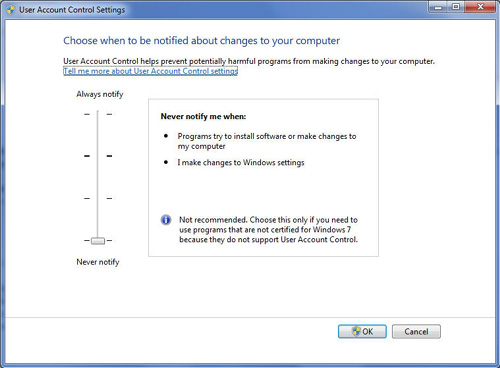
And especially, decontaminate the function UAC (User Account Control).
Warning: make a backup from all your files BEFORE decontaminating UAC
Open up Control Panel, and type in user account into the search box..
You'll see the link for "Turn User Account Control (UAC) on or off". Click it.
Uncheck the box "Use User Account (UAC) to help..." , and reboot your computer.
You should be done with obnoxious prompts!
Note: Disabling UAC will lead to a less secure system, so be warned.
- 32)Products allocations management for suplier back-order (Top)
(Necessary modules: EFYATTRIB)
EasyForYou manage the customer stock allocation for the supplier ordered products
The module “Allocation management” carries out the following operations automatically:
- As of reception of the goods coming from your supplier, during the encoding of the quantity, EasyForYou show the list of customers having ordered specimens of the delivered product.
- At This level, it is possible for you to allot the quantities for each open customer order.
- After validation, EasyForYou automatically generates the deliveries notes or invoices (at your choice) and automatically encloses the entirely delivered orders.
- 33)Print labels (Top)
(Necessary modules: EFYBARCODE)
Allows, in addition to the printing of a document, to print on a third printer, labels intended for the various products present on the document
To print labels relating to the documents :
1) Click the document tab for which you want to print labels
2) Click the Menu Files->Documents settingss, on the rigth click "Print labels"
3) If the labels must be printed on a specific printer, you can specify it in the menu : Tools->Parameters->Printing->Printer 3
4) If you do not want labels for specific products, in the menu File->Products->Categories, joint the product to a specific category and in the menu File->Categories->Select the product categories and uncheck "Print Labels"
- 34)Printing Error res://ieframe.dll/preview.js
(Top)
when printing after install IE8
1) Stop EFY
2) Be sure to be logged as Administrator
3) In Windows Start->Control Panel->Users->Turn UAC (user account control) OFF (disable UAC), restart your computer
4) In Windows Start->Program->Accessories->Command prompt (DOS) -> Right click and start as ADMINISTRATOR
5) In the DOS prompt enter the command: regsvr32 ole32.dll (press ENTER)
6) In the DOS prompt enter the command: regsvr32 ieframe.dll (press ENTER)
7) restart EFY and try to print
8) Other solution : Sometime the internet explorer work to slow (because of anti-virus or other...), the communication between easyforyou and the Internet explorer is to fast or to slow. In the root folder from EFY, near the easywin.exe, You create a text file mamed ALL.INI (see Possible parameter settings by INI Files ) and include the variable WaitCoef=3, restart EFY and test the printing, if that work not try with WaitCoef=4 , and so one, each time restart easyforyou.
9) If this work not, (look here -> https://support.microsoft.com/kb/957700) or in Windows, go to Start->Control pannel -> Software- and uninstall IE8 Beta
10) If this work not try to click here
- 36)Generate PDF files
(Top)
(Necessary modules: EFYMAIL)
How to print and send PDF files by Email:
To use the send PDF button (right-Click on the Email button), you have first to setup this function in Windows 10, please follow this procedure:
1) Click menu Help->Folder->EasyForYou Ok
In the open folder ...\EasyForYou,search and right-Click AddPrinter.exe (Run as administrator)
QUIT the software EasyForYou !
2) Navigate to Windows Start menu.
Click :Settings
Click :Devices in the Settings dialog.
Make sure you are in the section :Printers & scanners
Disable the setting :Let Windows manage my default printer by setting it to Off.
Click on your main printer and select :Set as default.
3) Restart EasyForYou and in menu Tools->Parameters->General Check E-mail With SMTP and clicl the button Setup E-Mail SMTP
Input your SMTP server in the field
Copy your email adress also in Bcc Email, In this way, you will receive a copy yourself to put un your :Send Email folder
If you need to send :Terms of Sales. With your unvoices (appends only with invoices),
you can make a PDF document like TermsOfSales.pdf and copy this file to the folder ...\EasyForYou
Put TermsOfSales.pdf in the filed :Attachment
Click the Send Test Button to check if the SMTP works fine.
If the Send Test lasts too long, then you have to setup the SMTP options in the frame :Options
NOTE: If you have another Windows Version, follow the installation procedure of the PDF printer https://www.easyforyou.be/EN/printpdf.htm
Parameters when sending documents by email to put in the ini file (like FT1.INI for invoices)
FileForAttachmentDoc (*filename.pdf for pdf file attachment with terms and conditions)
FileForTextSubjectMail (specific text for the subject)
FileForTextBodyMail (*filename.htm for specific text for the body)
Example in FT1.IN to have aspecific subject and body
FileForTextSubjectMail=mailSubject.txt
FileForTextBodyMail=mailBody.txt
(in the file mailSubject.txt put your specifict text to send with the invoices)
(in the file mailBody.txt put your specifict text to send with the invoices)
You can work with multiple language
In the case create a file for each language like :
mailSubjectEN.txt
mailSubjectFR.txt
mailSubjectNL.txt
...
Fine-tuning settings for PDF printing.
(Some computers, being faster or slowed down by low-quality antivirus programs, may experience timing issues when printing PDF files.)
These variables, which can be added or have their values modified in the ALL.ini configuration file, allow for fine-tuning adjustments.
Example of these variables with their default values:
MinimumKiloBytesPDF=150 * Average weight in kilobytes of your printed PDF files. This value can be adjusted as it varies depending on the type and weight of your logo printed in the document.
WaitPDF=1 * Number of seconds required for the document to be visible to the Windows Explorer in the c:\temp folder.
MaxWaitPDF=5 * Number of seconds required for the document to be copied and visible to the Windows Explorer in the X:\YourDrive or NAS server\EasyNet\Easy For You\PDFdocuments folder.
* Please remove the explanatory comments in the all.ini file.
(Necessary modules: EFYPDF)
You can easily automate daily or weekely the sending of PDF invoices to your all customers !
In the windows task planner, add a task with the command:
"C:\....\EasyNet\Easy For You\easywin.exe" "AUTOCHECKDOCTOSENDBYPDF"
You can also make so that emails sent in PDF are automatically accompanied by a few attached files.
Just put the files to be sent in the '.../Attachments/Type document...' folder
For example:
In the .../Attachments/OP1/... folder
- Photos or PDF files that illustrate your company (be careful with the size of the photos, if the files are too large, it will not work or emails will not reach your customers)
- In the .../Attachments/FT1/... folder
Sales conditions for your invoices in PDF form
- In the .../Attachments/NEV/... folder
The delivery conditions for your Delivery Notes in PDF form
Warning ! In case you put files in these folders, they will be sent with ALL related documents.
- 37) Additional Fields: variables
(Top)
Additional Fields customers/suppliers:
/POP: text/ -> displaying a popup with your text during encoding of new document specified in the parameter JouPopup from ALL.INI file
/GTB: text/ -> Get this text back when adding a new document (Exemple: chassis number of cars - garage).
/FAC: CUSTOMER-CODE/ -> When you work with the menu Tools->Regroup documents, the documents are regroupped in the customer CUSTOMER-CODE.
/APPROVER:CUSTOMER-CODE-from the approver/ -> When using the E-commerce, send a email copy of the order to the approver.
So if the order is approved, the approver can forward the email to the inventory manager to confirm the order.
Note: To add some specific fields regarding your business, when you add a new customer :
In all.ini, add this variable (or in menu Tools->Parameters->Miscellaneous 2->ALL->DefFieldsForAddFieldsCustomer) :
DefFieldsForAddFieldsCustomer=MyField1 : CRLF
CRLF MyField
2 :CRLFMyField
3 :CRLF
MyField
2 :CRLFMyField
3 :CRLF
You will retrieve the fields like this in the customer additional fields
/MyField1: PutHereYourValue1/
/MyField2: PutHereYourValue2/
/MyField3: PutHereYourValue3/
Note1: To load some specific fields from the Customer OR products ->Additional fields, when you load a package in a document from menu Edit->Load package:
Put the name of the variable in square brackets (example:MyField1)
in the description colum of the document.
When you load the package, the variable from the document descrition will be replaced with the value (PutHereYourValue1) from the customer or product additional fields or for any other fields from the Table products or customers from the database (To obtain the list of the available fields in your database, please get the module EFYMDBACCESS)
When you import customers-en.xls, you can also import data. fill the columns with your values after the last column like this :
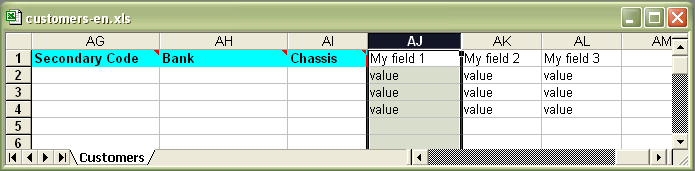
Additional Fields Products:
/NODISCOUNT/ -> When present in the product record, do not calculate the discount when using the Files->Documents Settings->Print the total discount on the document.
/PERCENT:Y/ -> When present in the product record, when you input hte this product in a document, the price is take as discount percentage.
/MESS(customer language):Your message/ -> Work only with (PERCENT:Y). When present in the product record, this message is printed on the bottom of the not paid invoices where the duedate is not the same as the invoice date (message example : )
All the other parameters are in C6 and C14 the setup e-commerce
/NODISCOUNT/ do no calculate the discount at the bottom of the document.
Additional Fields Categories:
/PrintColor:#FF0000/ -> When present in the memo field (for example #FF0000 for RED color) from categorie, print the product description in this HTML color code.
- 38) Check the validity of a Fiscal or VAT number on the WEB (Top)
(Necessary modules: Free)
To activate the online VAT chekking
On your computer, stop EasyForYou and in the folder c:\...\EasyForYou Edit the file ALL.INI and add a new variable with the url to your server like in this example :
CheckVATurl=https://ec.europa.eu
Save the file ALL.ini and restart EasyForYou
*we are not responsible for the use of this function and results. ! -> ec.europa.eu/taxation_customs/vies/disclaimer
- 39) Use EFY on multiple PCs via the Internet (only for single-user version).
(Top)
(Necessary modules: EFYNET2) -> download FREE DropBox 2Gb or FREE Google Drive 5Gb )
or FREE OneDrive 5Gb )
Example for an installation on a Workstation and Nootebook.
In this example, EasyForYou is already installed on the Workstation.
Carefully follow the order of these instructions.
Before you begin:
Make a backup copy in the Tools -> Daily backup at start-up
Make a update Easyforyou (menu Tools -> Update software)
To ease and speed synchronization, delete the help folder in c: \ .... \Easy For You \help
Then download and install Dropbox on the Workstation.
Create an account in DropBox, then share the folder c: \ .... \Easy For You to your Dropbox account
On the Nootebook
Download and install the trial version of EasyForYou
Start the trial version and input te information for your company.
Create a dummy document with clients and product demo and print it.
Enter the activation code (CD-KEY)
Open the folder c: \ .... \ Easy For You (see the installation folder by right clicking on the icon EasyForYou -> Properties)
In this folder c: \ .... \ Easy For You DELETE the files easywin.mdb and easywin.exe
To ease and speed synchronization, delete the help file in c: \ .... \ Easy For You\help
Download and install Dropbox
Share the folder c: \ .... \ Easy For You to to your Dropbox account
After a few minutes, the files will be synchronized and you can work on your Workstation or Nootebook (but not both simultaneously ! To do this see the FAQ No. 40) On the other hand, the remote folder Dropbox (cloud) is an additional backup security.
- 40) Rounding management for printing amounts including VAT
(Top)
(Necessary modules: EFYCURRENCIES)
Some are VAT inclusive, are difficult to obtain (magical prizes) in the documents.
For instance:
100.00 EUR including VAT (21%) = 82.64 EUR excluding VAT
(but 82.64 excluding VAT + 21% VAT = 99.99 EUR including VAT)
To solve this problem, click the Files->Currencies menu and change:
Number of decimals for unit prices: 4
Number of decimals for totals: 4
(leave 2 decimals for printing)
Example with 4 decimals (displays 2 decimals when printing documents):
100.00 EUR including VAT (21%) = 82.6462 EUR excluding VAT
(So 82,6462 excluding VAT + 21% VAT = 100.00 EUR VAT included)
- 41) Remote access via Internet
(Top)
(Necessary modules: EFYNET2, 5...)
Several options for remote access via the Internet.
(single user or multi-user).
Single user
https://www.splashtop.com (remote control)
Small multy users
wikipedia.org (NAS - Network Attached Storage)
Recommended NAS for EasyForYou -> www.synology.com
Multy users
- https://express.ikoula.com
(Shared Virtual Server area for Windows application)
https://www.soft4europe.com (Terminal Server emulation)
https://www.clouditup.com (CloudItUp - Cloud Shared area Windows Server application)
https://www.jetclouding.com (Cloud Computing Software - Citrix alternative without Windows Server)
https://www.thinstuff.com -> XP/VS Server (Terminal Server Emulation to install on your computer)
https://www.microsoft.com Windows-server remote-desktop-services (Microsoft terminal server - Home Server)
https://www.citrix.com (Terminal Server)
https://www.windream.com (Citrix)
https://www.youtube.com/watch?v=fi87Xe78YNY Allow Multiple Remote Desktop Sessions - Windows 10 (at your own risk)
https://www.splashtop.com SplashTop is a remote desktop software that allows users to control and access a computer from another device.
Video on Youtube : https://www.youtube.com/@SplashtopInc
https://www.hoptodesk.com HopToDesk is a FREE remote desktop software that allows users to control and access a computer from another device.
Video on Youtube : https://www.youtube.com/watch?v=Df-pTywKGDM
- 42)Version Mobile Version(Top)
(Necessary modules: EFYMOBILE)
User Manual Version Mobile

- 43)Setup Email Smtp With Gmail
(Top)
Parameters->General-Setup E-mail SMTP
Put your smtp adress something like (depends from your Internet provider):
Proximus Skynet or Belgacom = relay.skynet.be
Telenet = smtp.telenet.be
Etc...
...
If your internet provider does not provide an SMTP address, take a Gmail account (on Google)
SMTP Server : smtp.gmail.com
SMTP Port : 587
TLS : Cheked !
Login : Checked !
Username : yourmail@gmail.com
Password : Your password for your Gmail account
IMPORTANT for GMAIL SMTP : In your Google account->Change the settings of your google account as follows: